Emma Whitford writes at Inside Higher Ed about the appalling behavior
of students in the Welfare Economics and Social Choice Theory course
at Brown University. For the first time in 20 years teaching the course,
economics professor Roberto Serrano
gave his students a take-home midterm exam.
Quite a few students had expressed anxiety about being in a classroom
after a gunman killed two students and injured nine in a December
mass shooting at Brown, and so “it was appropriate,” he said,
to allow students to take their exams at home.
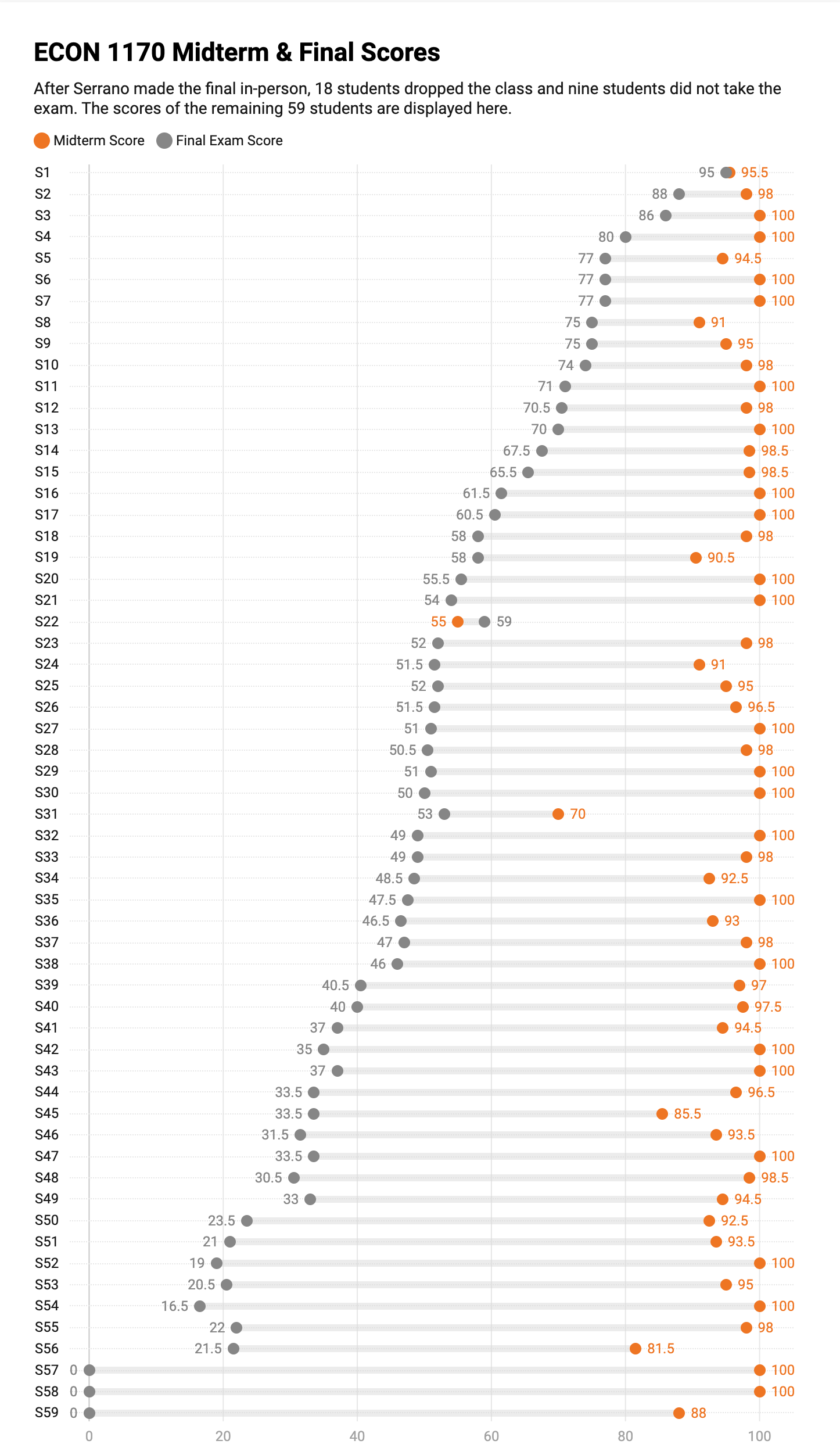
The average score on the take-home midterm was 96 percent.
“Historically the average grade in the midterm of this course
has ranged between 65 and 80 [percent], and this exam was harder
than the exams I wrote in the past…”
The student responses seemed “fishy” so he and his graders asked
ChatGPT to answer the test, and noted striking similarities with
what the students had turned in. He changed the final exam to an
in-person test.
“I am not declaring [the midterm] void for now. I am going to give the
class a chance to prove me wrong,” he wrote. “That is, if the
distribution of the final exam is roughly similar to the distribution
of the midterm, I will count the midterm. Otherwise, which is of
course what I expect to happen, I will declare the midterm void and
reweigh the final accordingly.”
Subsequent to his message, 18 of 86 students dropped the class, and
9 more did not take the final exam. Three students earned a
zero on the final (and two of those three scored 100 percent
on the take-home midterm), and the average score was 48.6 percent.
Only one student did better on the final than they did on the
midterm.
He published the anonymized student scores: brave, but fitting
for an economics professor.
Brown University’s response has been tepid. Here’s what spokesman
Brian Clark said:
Brown treats every allegation of academic integrity with the utmost seriousness.
In regard to this economics course, multiple academic leaders from Brown were in
touch with the faculty member who raised concerns to provide details about how
the allegations raised could be formally adjudicated. To date, the faculty member
has not provided the necessary details to the Standing Committee on the Academic
Code to pursue this path toward resolution.
But the University has taken no action. Professor Serrano submitted
this data to Brown’s committee in May and got no response. He went public with his
story in late June. Professor Serrano said:
“Their response, I must tell you, is seen as appalling and insufficient by hundreds
of people who have emailed me in support, many of them Brown alumni.”
“We cannot afford to have a society in which a significant fraction of our best
young minds think that cheating is OK,” he said. “That leads to a declining
society, to a failed society… We cannot choose to become idiots.”
Dave Plummer worked as a programmer at Microsoft in the 1990s. He wrote
the Smart Drive CD-ROM cache and DISKCOPY. He also invented and wrote
the first version of Task Manager. He just
posted a video about his
latest project:
Are you sick of windows getting just a little fatter every single year?
Tired of apps that need an account, a cloud sync, and 30 background services
just to open a damn text file? Well grab a seat, because today I’m actually
doing something about it.
He built a modern version of notepad.exe with the same features as were present
in the Windows XP-era version, and called it
TinyRetroPad.
The final executable size is only 2.5 kb. That’s smaller than the default size
for a single disk cluster in NTFS (i.e. the smallest unit of disk space that
can be allocated). It’s the same amount of disk space as the audio that goes along
with a single frame of his video.
About a year ago, Andreessen Horowitz (the largest venture capital firm in the
world), published a blog post showing that the
cost of LLM inference is dropping 10x per
year.
Andrej Karpathy, a member of the founding team at OpenAI and subsequently Tesla’s Sr.
Director of AI, says that in 2019 it cost $43k to train GPT-2. Today he can train a
model that performs similarly for $73.
That’s 600x cheaper in 7 years. Not the same metric, but maybe more important.
In the last few months, a bunch of new AI browsers have launched, including
Comet, Atlas, and Dia. I have no interest in these applications, they seem like
a privacy nightmare, and I’m perfectly happy to use Claude and ChatGPT in
a browser tab or in their native Mac apps.
Six years ago, the team at Kagi
decided to build a new browser called Orion
using the WebKit engine that powers Safari. They just
released Orion 1.0 for Mac. It’s already
available for iOS and iPadOS.
I’ve been an occasional Orion user for several years. It’s faster than Safari
every time I measure it. Orion loads and runs Safari, Chrome, and Firefox
extensions, including must haves like uBlock Origin and 1Password. Unlike
Chrome, Kagi offers full support for extensions using both manifest v2 and v3.
Orion has a robust AppleScript dictionary, and the user interface is excellent.
You can tell a lot about how much a Mac dev team cares about their app by
looking at the settings. Orion’s settings page is beautiful. This is a
Mac-assed Mac app.
Orion has no telemetry and no AI built in, and that receives top marks from me.
It’s not open source, but the development is done in the open with an
active user community. Kagi is working to bring
Orion to both Linux and Windows.
I’m going to give Orion a try as my daily driver, and I hope you do too.
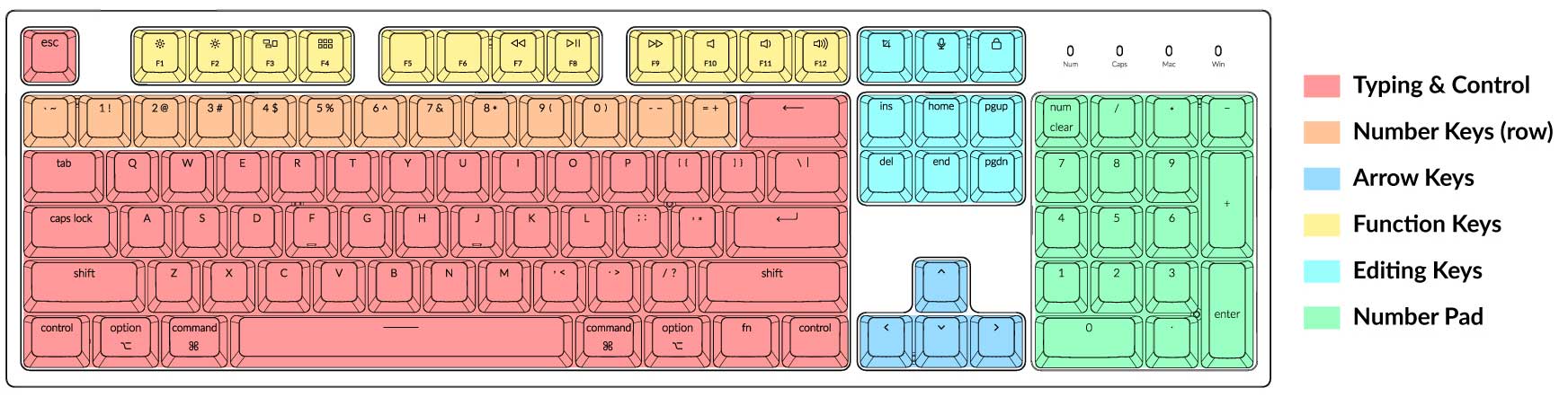
In the olden days, every computer keyboard had all the alphanumeric keys, a row
of function keys, an inverted T arrangement of arrow keys, edit keys
(page up, home, end, etc), and a number pad. Today there are
many different keyboard sizes,
with various combinations of all of these types of keys. Keyboard nerds know what
a 60% keyboard is. The rest of us call it a laptop keyboard. I use the
editing keys a lot when typing at my desk with a full size keyboard, and I
really miss them when using my laptop. Inspired by
Brett Terpstra’s Home Row Arrow Cluster,
I decided to see if I could figure out a solution.
I use a Macbook Air, so my approach is only useful for Mac users. Like
Brett, I decided to use Karabiner-Elements,
an outstanding low-level keyboard customizer. In Brett’s implementation, you hold
down the ; with your pinky, and then use IJKL for the arrow keys.
That feels uncomfortable to me, and I wanted to be able to use P and
; for Page Up and Page Down. I wanted something
where I could enter an edit key mode, then have the keys work as arrows and edit keys,
then leave the mode and they go back to normal. Kind of like how the
Num Lock key works. I can’t use Num Lock, because Apple
laptops and keyboards don’t have it. In it’s place is the Clear
key, which nobody uses because nobody knows what it does.
While experimenting with several keystroke options I discovered I was already
using them for something else. Funny how your fingers know to type a thing,
but your brain can’t remember all the things you know how to type. I finally
settled on using ⌃+Delete to activate and de-activate edit mode.
Once in edit mode, I had to decide which keys to use for arrow keys and edit keys.
I also experimented with this a lot. On my full size keyboard, I move my right hand
over to use the arrow keys, so I wanted to use keys on the right hand side of the
keyboard. I use my left hand for the modifier keys, so when I want to select backwards
by word I use my left hand to press and hold ⌥+⇧ and then use
my right hand to repeatedly press Left Arrow. I want to be able to do a similar
thing on my laptop.
I ended up with the following keys:
Key
Function
I
Up Arrow
J
Left Arrow
K
Down Arrow
L
Right Arrow
U
Home
O
End
N
Delete
Y
Page Up
H
Page Down
I configured IJKL for the arrow keys,
in a similar configuration to the gaming WASD
but on the right hand. Because I exclusively used Unix and Linux before ever
using Windows or MacOS, I have Home and End move to the beginning
and end of a line. U and O are logically positioned for those
actions. I originally had H for Delete, but changed it to
N so I can have Y and N for Page Up and
Page Down.
To implement this in Karabiner, you need to create a new complex rule, and paste in this JSON:
If these keys don’t work for you, and you are handy with JSON, you can probably
figure out how to edit this.
If you aren’t handy with JSON or aren’t a Karabiner expert, paste the code above
into your favorite chatbot, tell it this is a Karabiner-Elements complex
rule, and use plain english to describe what you want to change. It will do a
pretty good job of making the changes for you.